Confirmed software update Rollout announced 27 August 2026 · Research checked 28 August 2026
Meta’s camera-equipped glasses now disable recording when the capture indicator is covered—even if obstruction happens after recording begins. The update closes a practical loophole in the bystander signal and costs owners nothing. It strengthens one safeguard, but it cannot replace consent, visible social norms or local recording law.
Install the latest compatible firmware and do not attempt to defeat the Capture LED. The change makes Meta glasses easier for bystanders to understand and improves the ownership proposition. Prospective buyers should still decide whether a face-worn camera is appropriate in their workplace, school, home and community.
What Meta fixed
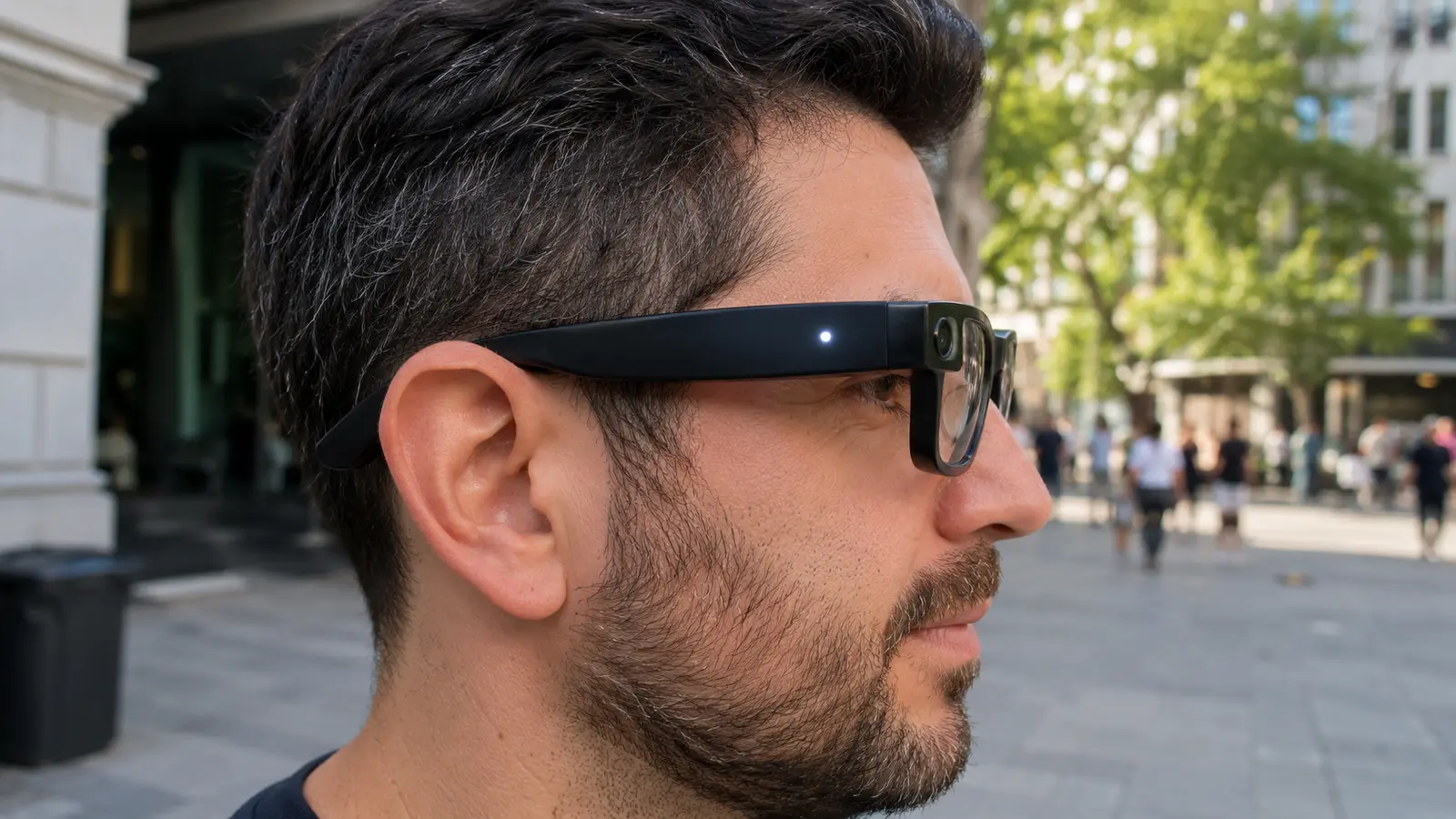
Meta’s glasses already used a bright white Capture LED to signal photos and videos. Earlier behavior could stop the camera when obstruction was detected at the start, yet reporting showed a user might begin recording and then cover the indicator. The new update makes the check persistent: if the light is covered after capture begins, the glasses stop recording.
Meta’s privacy documentation now states that physical covering, tampering or destruction of the Capture LED automatically disables the camera. The feature applies to compatible current camera-equipped Meta AI glasses after the relevant firmware reaches them. Rollouts can be staged, so two owners may not receive it on the same day.
| Situation | Expected behavior | Bystander meaning |
|---|---|---|
| Photo capture | White LED blinks briefly | A photo is being taken |
| Video capture | LED continues blinking during recording | Recording remains active |
| LED covered or damaged | Camera is disabled / recording stops | Obstruction should not enable hidden capture |
| Firmware not updated | Behavior may differ | Owner should update before relying on fix |
Why a capture light matters
A smartphone usually moves into a recognizable filming position. Smart glasses can record from the wearer’s natural line of sight, making the indicator a more important social cue. A visible light lets people ask questions, move away or request that capture stop.
The indicator is not a consent mechanism by itself. Someone may miss it in bright sun, have limited vision or not understand the device. The wearer remains responsible for communicating, especially in private homes, workplaces, changing areas, clinics, schools and confidential meetings.
What the update improves
Reliability of the physical recording signal and resistance to a simple obstruction technique.
What it cannot guarantee
That every person sees the light, agrees to capture, or that recordings are stored and shared responsibly.
How owners should check the update
- Charge the glasses and case, then connect the glasses to the official companion app.
- Install available app and glasses firmware updates using Meta’s instructions.
- Restart or reconnect if the update process requests it.
- In a private test with no bystanders, begin a short recording and verify the indicator is visible.
- Do not cover or damage the light as a routine test; use official diagnostics or support if behavior appears wrong.
- Review capture, cloud-sync and voice-storage settings after major firmware changes.
Exact menus can change by app version and phone. Owners should follow the current Meta support page instead of an old screenshot. If the indicator is damaged, stop using the camera and seek service; a broken safeguard is not merely cosmetic.
Legal, social and technical limits
Recording law varies by jurisdiction. One-party-consent rules in some places do not override private-property rules, employment contracts or sector-specific confidentiality. Other places require all parties to agree. Seek qualified advice for professional use and obtain clear consent rather than looking for the lowest legal threshold.
Technical privacy extends beyond capture. Owners should understand where media is stored, whether it uploads automatically, who can access the account, how long voice interactions are retained and how deletion works. Strong passwords and multifactor authentication reduce account risk.
Responsible-use practices
- Say that you plan to record before activating the camera.
- Respect “no recording” signs and requests immediately.
- Avoid sensitive locations even when a device technically functions.
- Review media before sharing; background faces and screens may reveal private information.
- Delete accidental clips and use limited audience settings.
- Teach household members how to recognize the Capture LED.
Does the update make Meta glasses worth buying?
It removes one legitimate concern from the product’s privacy design and demonstrates that the safeguard can be strengthened through firmware. That improves value for responsible owners who use hands-free photos, calls, audio and assistant functions.
It does not solve every acceptance issue. Some workplaces and social settings may prohibit camera glasses regardless of indicator behavior. Prescription lens cost, battery life, fit, camera quality, repair options and supported AI markets remain normal buying factors.
Better fit after the update
- Hands-free creators who clearly disclose capture.
- Travelers documenting public scenes responsibly.
- Owners who wanted stronger tamper resistance.
- Users already comfortable with Meta’s app and privacy controls.
Still a poor fit
- Workplaces or schools that prohibit wearable cameras.
- People uncomfortable with cloud-connected capture.
- Buyers who need all-day continuous video.
- Anyone intending to hide or defeat the indicator.
Guidance for people around smart glasses
A blinking white light means capture may be active. If you are uncomfortable, ask the wearer directly whether they are recording and request that they stop. In a business, school or venue, follow the organization’s policy and speak with staff if necessary.
Do not assume every pair of ordinary-looking glasses contains a camera, and avoid confrontation when a simple question will work. The update’s value depends on a shared understanding of the indicator, so public education matters as much as firmware.
A privacy threat model for owners
The covered-light loophole addressed deliberate concealment at capture time, but owner security also includes account takeover, accidental sharing, lost glasses and third-party apps. A strong threat model asks who could access content, how they could get it and what harm would follow.
Use a unique password and multifactor authentication, lock the connected phone, review linked devices and remove sessions you do not recognize. If glasses or phone are lost, follow Meta’s account and device guidance promptly. Do not leave sensitive clips waiting for an eventual cleanup.
Data-minimization choices
- Record only the moment needed rather than long continuous clips.
- Turn off automatic imports or cloud functions you do not use.
- Delete failed takes and background-heavy footage.
- Restrict sharing audiences and remove location data when appropriate.
- Review voice-assistant history separately from camera media.
- Disconnect apps that no longer need account access.
Guidance for workplaces, schools and venues
Organizations should write a device-neutral policy covering smart glasses, body cameras and phones. A blanket ban may be appropriate in changing rooms, exams, secure facilities and confidential care. Other spaces can allow disclosed capture with consent. Clear signs and staff training are more effective than improvising after a dispute.
Policies should explain whether the device may be worn with the camera disabled, how disability or prescription needs are handled, who can authorize recording and what happens after a violation. Staff should avoid demanding access to private media unless law and policy permit it.
Accessibility and legitimate hands-free use
Camera glasses can help people capture memories without holding a phone and can support visual assistance or communication functions. Privacy safeguards should not erase those benefits. The right balance is visible capture, informed context and proportional rules.
Some people may not notice the LED because of vision, attention or lighting. Verbal disclosure remains the most accessible approach. In group settings, make the request before the event starts so individuals can choose seating or opt out.
How to evaluate future smart-glasses privacy claims
Look for a visible indicator that cannot be disabled through normal settings, continuous tamper detection, clear recording sounds where appropriate and official documentation. Review whether photos and video behave differently and whether third-party apps can bypass the signal.
Independent testing should cover bright sun, low light, stickers, partial obstruction and damaged hardware without publishing instructions that enable misuse. A transparent vulnerability-response process matters because privacy design evolves after launch.
What the update means for resale and repair
Used buyers should update and test the glasses before capture. Cosmetic damage near the indicator may affect detection, and unauthorized repairs could compromise it. Ask for proof that the camera and LED function, then reset the device and remove the prior owner’s account.
Repair providers need procedures that preserve the light’s brightness and alignment. An aftermarket lens or frame modification should not obstruct the indicator. When in doubt, use authorized service.
Design principles every camera wearable should follow
A trustworthy capture indicator should be physically close to the camera, bright across common lighting, active for the entire recording and difficult to disable without also disabling capture. The user interface should explain failures clearly so an owner does not mistake a disabled camera for a random bug.
Hardware and software need to agree. A light that activates only after recording has started leaves a gap; an indicator controlled by an ordinary setting invites misuse. Tamper detection should fail safely by blocking capture, while repairs should include a diagnostic test of both camera and light.
Transparency information manufacturers should publish
- Exactly when the light blinks for photos, video and live streaming.
- How partial obstruction is detected.
- Which models and firmware versions receive the protection.
- Whether third-party apps use the same safeguard.
- What error message appears after tampering.
- How damaged indicators are repaired or replaced.
Family and household guidance
Households should agree where recording is acceptable before the glasses arrive. Bedrooms, bathrooms, private calls and children’s spaces deserve clear boundaries. Visitors should not have to identify an unfamiliar device on their own; the wearer can state when the camera is off and ask before capture.
Parents should review account sharing, automatic uploads and who can publish clips. A child who understands the recording light may still not understand audience permanence. Keep ownership and posting controls with an appropriate adult.
Why social trust affects product value
Smart glasses are useful only if people accept them. Hidden-looking capture can make friends, clients and venues reject the device entirely. A reliable visible indicator protects bystanders and responsible owners by making the product easier to trust.
That gives privacy engineering commercial value. Buyers should reward products that make recording obvious, give clear controls and receive security updates—not models that treat discretion as a way around consent.
Final privacy assessment
Stopping capture when the LED is covered closes a specific loophole and should be standard behavior for face-worn cameras. Meta deserves credit for improving the safeguard, while owners remain responsible for consent, context and secure media handling. Update the glasses and treat the light as the minimum visible signal—not permission.
Questions readers are asking
Can Meta glasses record with the light covered?
Meta’s updated behavior disables the camera or stops recording when the Capture LED is detected as covered, tampered with or destroyed on compatible updated glasses.
Does the update cost anything?
No separate charge or new hardware purchase has been announced. It is delivered through compatible software or firmware.
Does the LED prove recording is legal?
No. The light signals capture; it does not establish consent or override local law, workplace policy or private-property rules.
What if the Capture LED is damaged?
Stop using camera capture and contact official support. A damaged indicator undermines the product’s bystander safeguard and may disable the camera.
Sources and research method
FrediTech checked Meta’s public statement, privacy documentation and independent analysis on 28 August 2026. This article explains product behavior and is not legal advice.