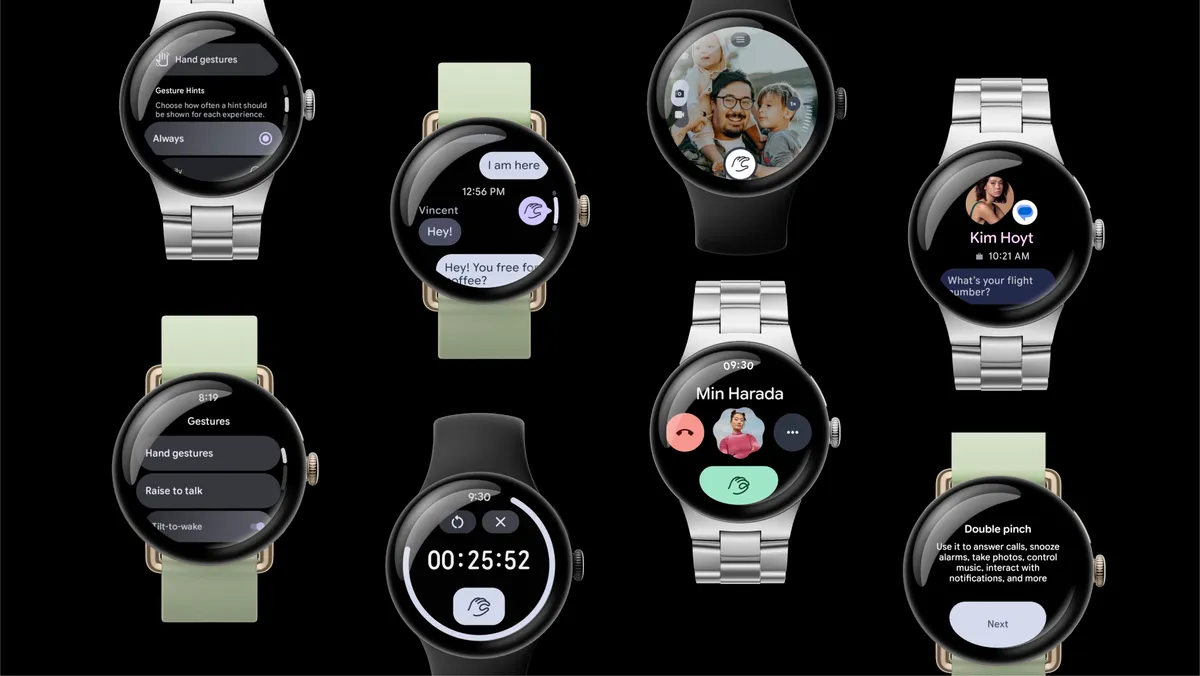

Google’s September 2026 Pixel Drop is expanding one-handed notification control on Pixel Watch 3 and Pixel Watch 4. Owners can use Double pinch to open and move through the notification tray without touching the screen, while Pixel Watch 4 also receives an updated Raise to Talk model intended to improve the accuracy and performance of hands-free Gemini activation. The rollout began September 15 and may arrive in stages.
The important detail is that hand gestures themselves are not new. Pixel Watch 4 gained Double pinch and Wrist turn in late 2025, and Google expanded those gestures to Pixel Watch 3 in March 2026. The September change broadens what those gestures can do, especially around notification-tray navigation. Google’s current support page says the hand-gesture system on Pixel Watch 3 and 4 requires Wear OS 6.1 or later and updated watch apps.
Pixel Watch pinch gesture: Quick answer
Google’s September Pixel Drop began rolling out September 15, 2026. On Pixel Watch 3 and Pixel Watch 4, Double pinch can now be used for broader notification-tray control, allowing one-handed opening and scrolling without swiping the display. The watches need Wear OS 6.1 or later, and Google advises keeping watch apps updated. Double pinch and Wrist turn are not new to these watches; September expands the existing gesture system. Pixel Watch 4 also gets an updated Raise to Talk recognition model for Gemini. Pixel Watch 1 and 2 are not included in Google’s current hand-gesture support page. Availability can vary during the staged rollout.
What changed in the September Pixel Drop?
Rollout
September 15, 2026
Price
Free update
Eligible for new tray control
Pixel Watch 3 & 4
Minimum for Watch 3/4 gestures
Wear OS 6.1+
Gemini improvement
Pixel Watch 4
Pixel Watch 1/2
Not included for this gesture feature
The broader September Pixel update also brings Android 17 QPR1 changes to supported phones. On the watch side, however, the headline is narrower: Google is making one-handed gestures more useful rather than launching a completely new input system.
What’s actually new? Pixel Watch 4 already supported Double pinch and Wrist turn, including actions on an expanded alerting notification. Pixel Watch 3 gained the gesture system earlier in 2026. September’s notable expansion is broader notification-tray opening/scrolling on Watch 3 and 4, while Watch 4 also gets a refined Raise to Talk model. That distinction avoids overstating the update.
This is an expansion of Pixel Watch gestures—not their first appearance
Google first introduced the current one-handed gesture system on Pixel Watch 4, then expanded it to Pixel Watch 3 in the March 2026 Pixel Drop. Double pinch is performed by tapping the index finger and thumb together twice. Wrist turn is a quick movement away from the wearer and back. Those gestures already handled contextual actions such as Smart Reply, timers, alarms, media and camera control.
There is also a useful historical nuance around notifications. Pixel Watch 4 could already use Double pinch to move through an expanded alerting notification, but independent testing found that manually opening the notification shade/list and navigating through it was a separate limitation. Current September coverage describes the new behavior as opening and scrolling the notification tray. That is a more meaningful change than simply repeating an old “scroll an alert” capability.
Which Pixel Watches get notification scrolling?
| Watch | Double pinch | Wrist turn | Notification tray control | Raise to Talk | September-specific change |
|---|---|---|---|---|---|
| Pixel Watch 1 | Not supported in current hand-gesture docs | Not supported | No | No | None for this feature |
| Pixel Watch 2 | Not supported in current hand-gesture docs | Not supported | No | No | None for this feature |
| Pixel Watch 3 | Existing | Existing | Expanded in September | No | Notification-tray opening/scrolling |
| Pixel Watch 4 | Existing | Existing | Expanded in September | Existing | Tray control + updated Raise to Talk model |
| Pixel Watch 5 | Current-generation system | Current-generation system | Already available in broader gesture experience | Supported | Not the main target of this backport |
Google’s current support page specifically lists Pixel Watch 3 and 4 with Wear OS 6.1 or later for the hand-gesture feature. Pixel Watch 5 is the newer generation and already has a broader gesture implementation, so the September story is mainly about bringing more complete notification control to Watch 3 and 4 rather than making Watch 5 eligible for the first time.
How Double pinch works
Google defines Double pinch as touching or tapping the index finger and thumb together twice. The watch recognizes the hand movement and maps it to a context-sensitive primary action. That context matters: the gesture is not a universal “scroll anywhere” command for Wear OS. Google shows on-screen hints where Double pinch is available.
In notifications, September’s update makes the gesture more useful because the notification tray is one of the interfaces people open most often. Instead of reaching across with the opposite hand and swiping a small display, a user can keep the watch arm in place and trigger the gesture with the same hand.
How to scroll Pixel Watch notifications one handed
- Confirm you have a supported watch and the required software.
- Raise the watch normally and open or receive a notification.
- Tap your index finger and thumb together twice to perform Double pinch.
- Repeat Double pinch where the interface shows that the action is available to move through supported notification content or the notification tray.
- Use Wrist turn in supported contexts to close an expanded notification.
The exact action depends on what is on screen. If the gesture does not respond, do not assume the watch is faulty. The feature may not yet have reached your device, the current screen may not expose a gesture action, or an app may need updating.
Everything else Double pinch can already do
| Action | Gesture | Status in September 2026 |
|---|---|---|
| Open/scroll notifications | Double pinch | Expanded September behavior on Watch 3/4 |
| Send first available Smart Reply | Double pinch | Existing contextual action |
| Play/pause media | Double pinch | Existing |
| Start/stop timer or stopwatch | Double pinch | Existing |
| Stop a firing timer | Double pinch | Existing |
| Snooze an alarm | Double pinch | Existing |
| Take photo / start or stop video | Double pinch | Existing with supported Camera control |
| Close expanded notification | Wrist turn | Existing |
| Raise to Talk Gemini | Raise wrist toward mouth | Separate feature on Watch 4/5; model refined on Watch 4 |
What Wrist turn does
Wrist turn is the second major one-handed gesture. Google describes it as quickly turning the wrist away and then back. It is a dismiss or back-style action in supported contexts, such as closing an expanded notification. It should not be described as the notification-scrolling gesture: scrolling and primary actions are tied to Double pinch.
How to enable or disable hand gestures
Google says one-handed hand gestures are enabled by default on eligible Pixel Watches. On the watch, open Settings → Gestures → Hand gestures, then manage Double pinch and Wrist turn. From the Google Pixel Watch phone app, use Settings → Gestures → Hand gestures. Google also lets users choose how frequently gesture hints appear: Always, Daily, Weekly, Monthly or Once.
How to use the Pixel Watch gesture tutorial
Pixel Watch includes an interactive tutorial, which is valuable because recognition is easier to learn through practice than through written instructions. On the watch, go to Settings → General → Pixel Tips, choose Hand gestures, and continue through the prompts. You can also open Settings → Gestures → Hand gestures and use the education/tutorial option.
Pixel Watch 4 also gets better Gemini Raise to Talk
Pixel Watch 4 receives a second September improvement: an updated Raise to Talk recognition model. Google and current Pixel Drop coverage describe the change as improving accuracy and performance when activating Gemini. Raise to Talk itself is not new. The update is intended to make an existing hands-free assistant feature recognize the user more reliably.
What Raise to Talk actually does
Raise to Talk lets a Pixel Watch 4 or 5 user bring the watch toward the mouth and begin speaking without saying “Hey Google” or pressing a button. Google’s support page says the feature requires Wear OS 6 or later, a compatible Google Pixel phone and Gemini set as the default assistant. It is off by default.
Google advises bringing the watch roughly 2–4 inches from the mouth. A visual indicator appears when the watch is ready for voice input, and the user should begin speaking while that indicator is active. This is a separate gesture family from Double pinch and Wrist turn, which is why Pixel Watch 3 gaining one-handed hand gestures does not automatically give it Raise to Talk.
Why Pixel Watch 3 does not get Raise to Talk
Google’s current compatibility page limits Raise to Talk to Pixel Watch 4 and Pixel Watch 5. Pixel Watch 3 can use the Double pinch and Wrist turn hand-gesture system when it meets the software requirements, but it does not gain Raise to Talk simply because both features involve wrist or hand movement. That distinction should matter in Watch 3-versus-Watch 4 buying comparisons.
How to improve Raise to Talk recognition
- Confirm Gemini is the default assistant on the paired compatible Pixel phone.
- Make sure Raise to Talk is enabled under Settings → Gestures.
- Bring the watch close to the mouth before speaking.
- Wait for the visual listening indicator before beginning the request.
- Adjust Gesture Sensitivity and Voice Sensitivity if activations are too difficult or too frequent.
Google says higher sensitivity makes activation easier but may increase accidental triggers, while lower sensitivity can reduce false activations at the cost of requiring a more deliberate motion or clearer voice trigger. That trade-off is useful because it gives Watch 4 owners some control over reliability rather than forcing one recognition threshold on everyone.
Why one-handed gestures matter for accessibility and convenience
The practical value of this update is not novelty. Smartwatch displays are small, and even a simple swipe requires the opposite hand. One-handed gestures can reduce that dependency while someone is carrying shopping, holding a rail during a commute, cooking, walking, exercising or simply unable to interact comfortably with a small touchscreen.
Google also presents gesture controls as useful accessibility tools, but FrediTech would not describe them as a medical solution. Recognition reliability, false positives, handedness, vigorous movement and glove use still deserve independent testing. Google does not provide a quantified battery penalty for gesture recognition in the current support material, so claims that the feature has “zero battery impact” would also be premature.
Pixel Watch 3 vs Watch 4: Gesture differences after the update
For Pixel Watch 3 owners, the September value is straightforward: the gesture system that arrived earlier in 2026 becomes more useful for a high-frequency task—notifications. That strengthens the case for keeping an older watch rather than upgrading purely for basic one-handed control.
Pixel Watch 4 gets the same expanded notification handling plus the Raise to Talk model refinement. That makes Watch 4 the more complete hands-free experience of the two. It still does not mean Watch 3 and Watch 4 now match every Pixel Watch 5 gesture or AI capability. Google’s newer watch has a broader current-generation interaction system and newer Gemini features.
For broader wearable context, FrediTech’s Fitbit Air buying guide shows how software and ecosystem support can matter as much as headline hardware, while our Galaxy Watch 8 vs Galaxy Watch Ultra comparison covers a different Android-watch ecosystem.
How Pixel Watch gestures compare with Apple Watch and Galaxy Watch
Google is not alone in using finger and wrist movements to reduce touchscreen dependence. Apple Watch supports Double Tap on compatible hardware for actions such as answering calls, replying to messages, scrolling supported apps and navigating Smart Stack. Samsung’s current Galaxy Watch gesture system includes Double pinch for calls, alarms, media and camera control, while Universal Gestures offers a more accessibility-focused navigation system on supported models.
| Ecosystem | Representative gesture | Notification/navigation use | Other actions | Important limits |
|---|---|---|---|---|
| Google Pixel Watch | Double pinch / Wrist turn | Notification tray and alert actions on supported models | Media, timers, alarms, camera, Smart Reply | Context-dependent; model/software limits |
| Apple Watch | Double Tap | Scroll supported apps/Smart Stack; message/call actions | Media, timers, camera remote and more | Compatible hardware and screen/context restrictions |
| Samsung Galaxy Watch | Double pinch plus Universal Gestures | Universal Gestures can navigate items; other gestures handle alerts | Calls, alarms, media, camera, app launch | Behavior varies by model/software and gesture mode |
These systems are functionally comparable but not technically identical. Different sensors, software frameworks, supported actions and accessibility modes make a simple “which gesture is best?” ranking misleading. The useful question is whether each ecosystem supports the actions a buyer actually performs most often.
What to do if Double pinch notification scrolling is missing
- Confirm the watch model. Google’s current hand-gesture support page names Pixel Watch 3 and 4 for Wear OS 6.1+ gestures.
- Check the Wear OS version and install available watch updates.
- Update watch apps from Google Play.
- Restart the watch after updates complete.
- Open Settings → Gestures → Hand gestures and confirm Double pinch is enabled.
- Run the built-in hand-gesture tutorial.
- If everything is current, allow time for the staged Pixel Drop rollout.
A factory reset should not be the first response to a missing rollout feature. Google often stages Pixel features, and the public sources do not clearly separate whether this specific behavior is delivered only by an OTA, app updates, server-side enablement or a combination. The safe advice is to keep both the watch software and watch apps current and wait for the rollout if the feature is not yet present.
Does this change which Pixel Watch you should buy?
Not by itself. Gesture expansion improves everyday usability, but it should be one factor among battery life, display, health features, software support, price and phone compatibility. A discounted Pixel Watch 3 becomes more attractive when software backports keep adding useful controls. Pixel Watch 4 offers the stronger hands-free package because it combines the gesture system with Raise to Talk. Pixel Watch 5 remains the current-generation option with newer hardware and a broader Gemini-focused experience.
If your main goal is notification handling while your opposite hand is occupied, Watch 3 and Watch 4 now cover more of that need without requiring a hardware upgrade. Buyers comparing ecosystems should also consider alternatives rather than buying solely for a gesture; FrediTech’s fitness tracker guide and Garmin Venu 3S value analysis provide additional wearable context.
FrediTech verdict
Google is gradually turning Pixel Watch hand gestures from occasional shortcuts into a more complete one-handed control system. The September update matters because notifications are among the most frequent smartwatch interactions, and the new tray-level control reduces the need to reach over and swipe the display. Pixel Watch 3 benefits most from the continuing backport of useful controls, while Pixel Watch 4 gains both broader notification handling and a refined Raise to Talk model. The update does not replace touch, the crown or voice, and recognition still needs real-world testing, but it adds genuine everyday utility without requiring new hardware.
Frequently Asked Questions
What is the Pixel Watch pinch gesture?
Double pinch means tapping the index finger and thumb together twice to trigger a context-sensitive action on supported Pixel Watches.
Which Pixel Watches support Double pinch?
Google’s current hand-gesture support page lists Pixel Watch 3 and Pixel Watch 4 with Wear OS 6.1 or later. Pixel Watch 5 has the newer current-generation gesture system.
Does Pixel Watch 3 support notification scrolling?
Yes. September 2026 expands one-handed notification-tray control for Pixel Watch 3.
Does Pixel Watch 4 support notification scrolling?
Yes. Watch 4 already supported actions on alerting notifications, and September expands notification-tray control.
Does Pixel Watch 2 get the new gesture feature?
No. Google’s current hand-gesture support page does not include Pixel Watch 2 for this one-handed gesture system.
What Wear OS version do Pixel Watch 3 and 4 need?
Google specifies Wear OS 6.1 or later for hand gestures on Pixel Watch 3 and 4.
How do I enable Double pinch?
On the watch, use Settings → Gestures → Hand gestures. Google says one-handed gestures are enabled by default on eligible watches.
How do I scroll notifications one handed?
Where supported, perform Double pinch by tapping your index finger and thumb together twice. Repeat when the interface indicates the action is available.
What does Wrist turn do?
It is a dismiss/back-style gesture in supported contexts, such as closing an expanded notification. It is not the main scrolling gesture.
Can Double pinch control music?
Yes. Google lists play/pause media as an existing Double pinch action in supported contexts.
Can Double pinch snooze alarms?
Yes. Snoozing a firing alarm is one of Google’s listed Double pinch actions.
Can Double pinch take photos?
Yes, with supported Pixel Camera remote functionality, Double pinch can trigger a photo and start or stop video recording.
What changed with Gemini on Pixel Watch 4?
The September update introduces a refined Raise to Talk model intended to improve recognition accuracy and performance.
What is Raise to Talk?
Raise to Talk lets Pixel Watch 4 or 5 users bring the watch toward the mouth and speak to activate Gemini without a hotword or button press.
Does Raise to Talk work on Pixel Watch 3?
No. Google currently lists Raise to Talk for Pixel Watch 4 and 5, not Watch 3.
Why is notification scrolling missing from my watch?
Check the model, Wear OS version, app updates and gesture setting, then run the tutorial. The September Pixel Drop may also be rolling out in stages.
Sources and Further Reading
- Google Pixel Watch Help — Control your Pixel Watch with hand gestures
- Google Pixel Watch Help — Activate Gemini with Raise to Talk
- Google — Pixel Watch one-handed gesture update history
- Google — March 2026 Pixel Drop
- 9to5Google — September 2026 Pixel Drop
- Apple Support — Double Tap gestures
- Samsung — Universal Gestures accessibility overview